CONFIRMED SWINGS · SELECTIVE LEVELS · PRICE ALERTS
Support & Resistance: TradingView Levels & Alerts Indicator
Keep meaningful price levels in view without filling your chart with lines. Compare confirmed swing evidence, higher-timeframe sources and price events in one selective support and resistance workflow.
Open Support & Resistance on TradingView ↗ (paid link)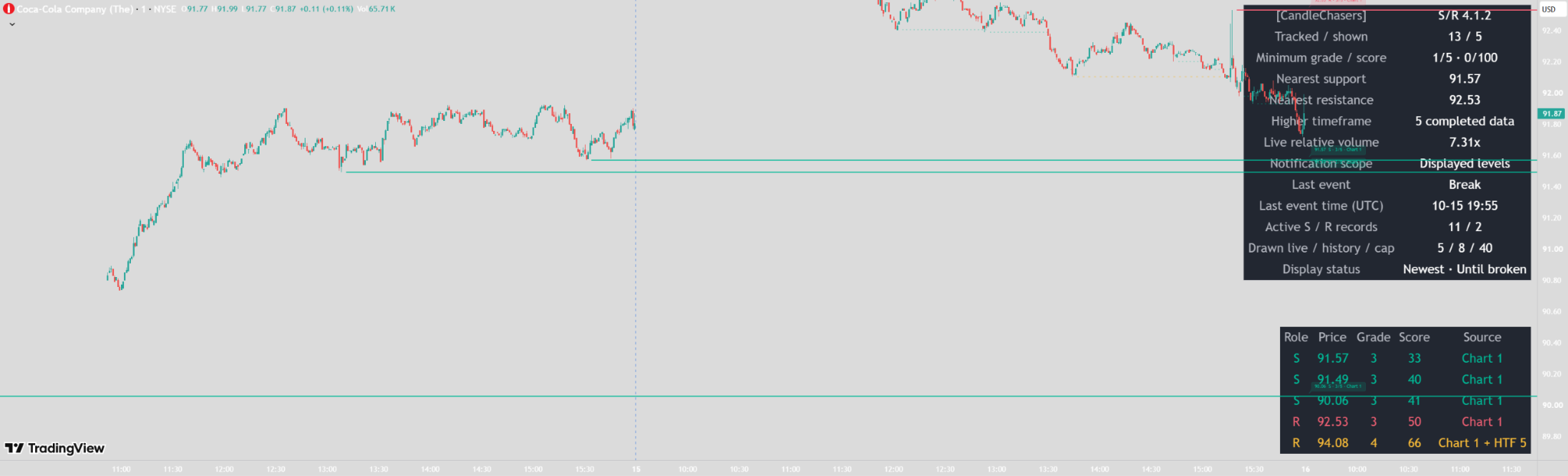
How support and resistance levels are found
Support starts with a confirmed swing low; resistance starts with a confirmed swing high. Each side has its own left-side lookback and shares a right-side confirmation window. A candidate must also show a minimum close-based move away, measured against the pivot candle’s ATR.
Nearby qualifying candidates add evidence to an existing same-role level instead of creating another line. The representative price remains fixed when that evidence is added. Levels begin on the detection candle, never back at the original swing.
Starting settings
| Setting | Default | Purpose |
|---|---|---|
| Left lookback | 50 bars per side | Defines the swing comparison window. |
| Right confirmation | 3 bars | Delays discovery until the swing is confirmed. |
| Minimum reaction | 0.75 pivot ATR | Requires a close-based move away. |
| Spacing | 0.50 chart ATR | Limits closely overlapping levels. |
| Visible levels | Up to 3 supports below and 3 resistances above price | Keeps the view selective. |
| Selection / extension | Newest / Until broken | Chooses which eligible levels appear and how long they extend. |
These values are starting points, not universally optimized settings.
Read the lines before the scores
- Solid: unbroken, including a retained unbroken level that reached its configured bar limit.
- Dotted: a broken level retained in history.
- Teal by default: chart-timeframe support.
- Red by default: chart-timeframe resistance.
- Gold and slightly thicker by default: higher-timeframe evidence; check the source label for its role and timeframe.
Choose Until broken or Until broken or bar limit. Close and Wick break modes both commit at the chart candle close. Equality at the threshold is a touch, not a break. Optional tick or ATR buffers freeze at creation; the line and price label stay at the original price.
Strength grade and evidence score are different
The 1–5 grade starts at 1, adds 1 for a qualifying reaction of at least 1 ATR or 2 at 2 ATR or more, and adds up to 2 for additional qualifying swing evidence. A minimum grade of 3 shows grades 3–5. Nearby higher-timeframe discoveries can add evidence.
The separate 0–100 evidence score includes reaction size, swing evidence, source/confluence, source pivot relative volume and observed rejections, with repeated-visit and age penalties. Minimum score filtering is independent of minimum grade.
| Score component | Points |
|---|---|
| Base | 10 |
| Reaction | Up to 30 |
| Swing evidence | Up to 20 |
| Source / confluence | Up to 15 |
| Volume | Up to 10 |
| Observed rejections | Up to 15 |
| Repeated visits / age | Subtract up to 15 / 10 |
The total is clamped to 0–100. Completed records retain their evidence and age at completion. Neither score nor grade is a probability that a level will hold. Hover strength labels for measurements or compare the Detailed dashboard ledger.
Read the Coca-Cola chart example
The supplied one-minute screenshot separates 13 tracked records from 5 shown lines. The ledger lists each displayed price, role, grade, score and source. One gold resistance includes Chart 1 + HTF 5 evidence. The nearest support and resistance are context readings, not entry instructions or guaranteed turning points. Live values in this screenshot are only an example of the dashboard.
Tracking is not the same as display
Newest is the default priority; Nearest and Strongest are alternatives. Selected active lines get drawing space first. Recent completed history uses the remaining space, within separate broken and expired limits. A hidden active level can still be tracked.
At tracking capacity, the oldest created record is retired to admit a distinct new level; retirement is not a break. Older completed records are removed first. Until broken disables age expiry, not capacity or display limits.
Add higher-timeframe context
The optional source defaults to daily and uses confirmed swings from completed higher-timeframe data. Select a source above the chart timeframe. Labels distinguish chart-only, HTF-only and shared Chart + HTF evidence. Nearby discoveries can share one fixed representative line.
Higher-timeframe levels still need adequate history, confirmation and qualification. Enabling the source does not guarantee a visible gold line, stronger reactions or a market-phase classification.
Configure price-event alerts
Ten named conditions cover support/resistance breaks, role-reversal retests, touches, rejections and approaches. Configure contact tolerance, distinct-visit separation and per-level cooldowns. Approach distance can use ticks or chart ATR.
Choose Displayed levels or All qualifying levels. Displayed-level notification scope uses a selection calculated from the previous close before current events, with available scoring and spacing values. It can differ from the live selection during the candle. Minimum grade and score still apply; retest eligibility is captured at the qualifying break.
Independent relative-volume filters for new pivot evidence, touch/rejection notifications and break/retest notifications default off. Enabled filters fail without usable volume. A physically broken line still stops and becomes dotted even if its alert is suppressed. Approaches are distance-based and not volume-filtered.
- Create the desired named alert in TradingView.
- Select Once Per Bar Close.
- Enable the retest setting if you want retest alerts.
- Recreate saved alerts after changing code or inputs.
Getting started
- Add the indicator to a standard candlestick chart.
- Begin with the default swing, reaction and spacing settings.
- Compare Newest, Nearest and Strongest selection on your instrument.
- Review grade and score separately before tightening filters.
- If using HTF evidence, choose a source above the chart timeframe.
- Use the Detailed dashboard to reconcile tracked records and displayed lines, then configure alerts.
Choose Compact or Detailed dashboards and Small, Medium, Large or Hidden size. Detailed adds a displayed-level ledger. Price/strength labels have adjustable spacing above their lines. Inputs remain available in Settings → Inputs even though their values are hidden from the status line.
Timing and limitations
Swing confirmation deliberately delays discovery. Break, reaction and alert decisions commit at chart candle close; higher-timeframe requests use completed source data. During an open candle, live price, ATR spacing, relative volume, label positions and which eligible levels appear can change. This is different from moving a stored level’s price.
Feed revisions, loaded history and setting changes can alter recalculated results. Support and resistance are approximate areas of interest even when drawn as single lines. They can break, fail to react or lose relevance. This analytical indicator is not an automated strategy and claims no verified win rate, profitability or trading edge.
Common questions
Why do I only see dotted lines?
Check active-record counts, extension mode, minimum grade/score, source confirmation and display status. No active level is invented when no qualifying unbroken candidate exists.
Does a score of 80 mean an 80% chance of holding?
No. It summarizes evidence and penalties under the indicator’s rules; it is not a probability or performance forecast.
Why was a level broken without an alert?
Physical break tracking and notification eligibility are separate. Scope, grade, score, volume and cooldown rules can suppress an alert while the line still stops and becomes dotted.
Are levels drawn back onto the original swing?
No. They start at detection after swing confirmation and reaction qualification.
Explore Market State Engine for environment and trigger context, or Smart Money Concepts Pro for structure, liquidity and zones.
View the published script ↗ (paid link)