STRUCTURE · LIQUIDITY · ZONES · SESSIONS
Smart Money Concepts Pro: TradingView Structure & Liquidity Indicator
Follow the sweep, structure shift, displacement and zone rejection behind a qualified setup. Inspect the sequence instead of treating every overlay as an independent signal.
Open Smart Money Concepts Pro on TradingView ↗ (paid link)This tool does not place trades or infer institutional orders from candle data. No win rate, accuracy or future profitability is claimed.
A qualified long setup, step by step
With sequence enforcement enabled:
- Sell-side liquidity sweep: a wick breaches a tracked low, then the candle closes back inside.
- Later bullish structure break: the selected internal or swing engine records a directional break. You can require CHoCH instead of any directional break.
- Bullish displacement: on the shift bar or a later bar.
- Later bullish rejection: an eligible existing zone detected at or after the shift is rejected.
Shorts invert this sequence. Opposite breaks or sweeps reset it, it expires after the configured interval, and a qualified setup consumes it. Swing bias and enabled premium/discount, higher-timeframe, session and cooldown filters must also pass.
Touching a zone is not enough
A rejection overlaps the zone, closes beyond its near edge in the expected direction, and does not breach the distal edge on that candle. First-only or multiple distinct retest encounters can be selected. The latest-setup panel records actual event prices/times and passed filters: an audit trail, not a confidence or probability score.
BOS, CHoCH and confirmation delay
| Label | Meaning under these rules |
|---|---|
| BOS | A continuation close through an unbroken same-direction pivot. |
| CHoCH | A reversal close through a protected opposite pivot anchored by the preceding directional break. Smaller new pivots alone do not change that level. |
| Swing / internal pivot | Confirmed after the selected number of right-side bars, not known at the pivot candle itself. |
Liquidity pools and sweeps
Pools track unswept swing highs/lows. Nearby same-source pivots can merge into equal-high/low clusters. A wick breach and close back inside is a sweep. A close-through consumes the pool without being classified as a sweep. Completed session levels can optionally become source-labelled pools; that integration defaults off.
Order blocks and fair value gaps
Order blocks use the nearest opposing candle before a qualifying swing break, with displacement and body/range thresholds. An optional recent directional FVG validates the block. Candidates crossed at their distal edge or re-entered after departure before detection are rejected.
FVGs require three-candle wick non-overlap, a directional middle candle and a minimum width relative to prior-bar ATR. Zones track fresh, touched and partially filled states, then retire under mitigation, invalidation, expiry or capacity rules. Active-only and bounded historical views are available.
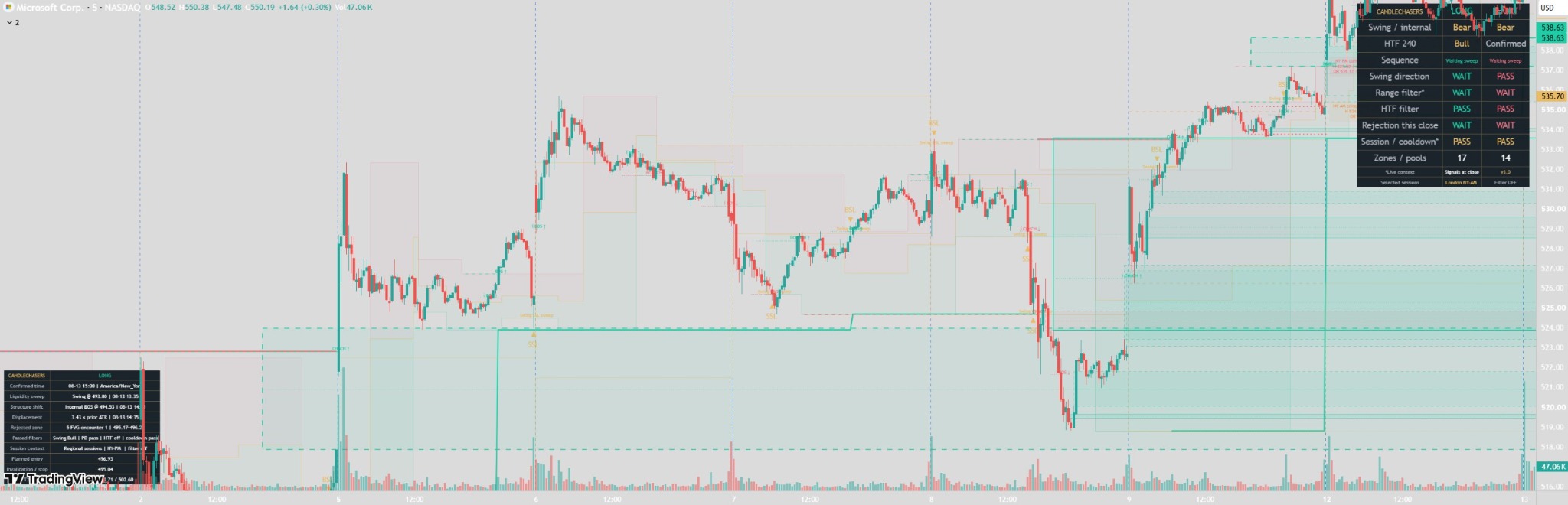
Reading the Microsoft chart example
The supplied five-minute Microsoft chart shows structure labels, liquidity levels, zone overlays and setup panels. A busy chart is not a series of qualified entries. Use the current dashboard to inspect waiting/passing filters and the latest-setup explanation to trace the recorded sequence.
OB/FVG boxes extend to their historical geometric origins with detection-time labels. The left edge does not mean a signal was available then. Structure labels appear when detected, and pivot detection retains its confirmation delay. The screenshot is a chart illustration, not a performance report.
Confirmed higher-timeframe context
Bias, structure and zones use previously completed higher-timeframe values. Imported events appear at the first following chart-candle close. Optional higher-timeframe bias agreement filters setups. Select a higher timeframe strictly above the chart timeframe, or disable that context.
Sessions and opening ranges
Regional mode includes editable Sydney, Asia/Tokyo, Frankfurt, London, New York full, New York AM, New York PM and Custom windows. IANA timezones handle regional daylight-saving behavior. Custom supports Toronto and other common zones plus an arbitrary supported IANA option. Selected windows combine with OR.
New York kill-zone mode uses four editable presets on the New York clock:
| Window | Hours |
|---|---|
| Asia | 19:00–00:00 |
| London | 02:00–05:00 |
| NY AM | 07:00–10:00 |
| NY PM | 13:00–16:00 |
Sydney, Frankfurt and NY Full are inactive in that mode; Custom remains available. These are configurable analysis conventions, not exchange holiday calendars.
Session highs/lows develop on confirmed chart candles and freeze after completion. Opening ranges default to the first 30 elapsed minutes and freeze before lines are drawn. Only fully contained chart bars are used; partial observations are labelled and missing intrabars are not synthesized.
Getting started
- Add the published indicator to standard time-based candles.
- Choose a chart interval aligned with session/opening-range boundaries.
- Select a higher timeframe above the chart, or disable higher-timeframe context.
- Review structure engine, sequence enforcement and selected filters.
- Choose Minimal, Structure or Full Suite for visibility; these presets do not change setup detection.
- Inspect qualifying and rejected setups before creating alerts.
The master session filter and session-range liquidity integration default off. Selective filters can produce few or no setups. Defaults are not optimized for any market.
Planning levels are not orders
Optional planning lines show signal-close entry, an ATR-buffered zone stop and three increasing R-multiple targets. These are static planning levels, not filled orders or trading recommendations.
Alerts
Named conditions cover bullish/bearish BOS, CHoCH, sweeps, order blocks, FVGs and qualified setups. Select Once Per Bar Close for named alerts.
Select Any alert() function call for detailed setup messages with event provenance, zone/source timeframe, sessions and planned prices. Optional new-zone and session/opening-range completion messages can be included. Several distinct events may send messages at one confirmed close. Recreate alerts after input changes.
Realtime behavior and limitations
Chart events and setup markers confirm at close. Some dashboard context uses the live close; developing session ranges change as new confirmed candles extend them, while completed ranges freeze. Not every visual element is immutable.
Mid-session history, missing bars or intervals crossing boundaries can make opening ranges partial or unavailable. Session hours do not account for holidays. Premium/discount uses the latest confirmed high/low pair, not a frozen impulse leg.
Common questions
Does an order block prove institutional buying or selling?
No. It is a rule-based candle zone, not evidence of actual institutional orders.
Was the zone available at its historical origin?
Not necessarily. Check its detection-time label and the confirmation delay.
Is the latest-setup panel a probability score?
No. It records actual event prices/times and passed filters.
Why are there few or no setup markers?
The full sequence and enabled filters must align. A zone or structure label alone does not qualify a setup.
Explore Market State Engine for separate environment/entry scoring or Squeeze Engine PRO for compression and momentum.
View the published script ↗ (paid link)