VOLATILITY COMPRESSION · DIRECTIONAL MOMENTUM
Squeeze Engine PRO: TradingView Squeeze & Momentum Indicator
A squeeze is not an entry. Distinguish compression, release, qualified entries and virtual exits with three selectable engines.
Open Squeeze Engine PRO on TradingView ↗ (paid link)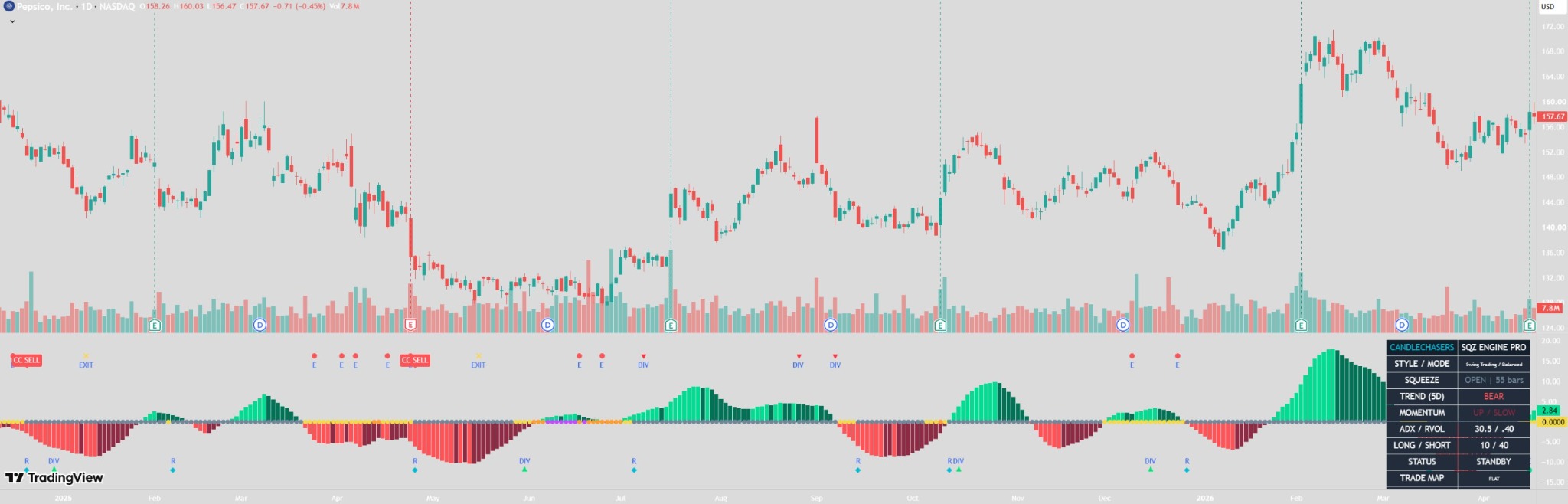
What the indicator measures
Bollinger Bands are compared with Keltner Channels to identify loose, medium and deep compression. PRO and Early use detrended linear-regression momentum. A release occurs when volatility leaves the outer compression envelope.
PRO, Early and Classic
| Engine | Entry qualification |
|---|---|
| PRO | Local EMA trend, optional confirmed higher-timeframe trend, optional ADX/directional movement and relative volume, and a confluence threshold. |
| Early | Permits qualifying entries during compression. Uses momentum slope rather than acceleration as its impulse requirement. Filters and the zero-side requirement still apply unless disabled. |
| Classic | Momentum sign on the release bar, with optional slope logic that can allow opposite-zero-side momentum. Bypasses PRO filters and confluence scoring. Uses fixed 20-period compression lengths and 12-bar close momentum. |
Presets change rules, not your chart timeframe
Scalping, Day Trading and Swing Trading set PRO/Early lengths to 14, 20 and 24; local EMAs to 34, 50 and 89; and inclusive post-release windows to 3, 5 and 7 bars. Classic retains fixed compression lengths.
Earlier Signals, Balanced and Stronger Confirmation change duration, score and ADX/relative-volume thresholds. Stronger Confirmation also requires sustained momentum. The label describes its rules, not a tested reduction in false signals.
Read the colors and markers
- Bright green: positive momentum rising. Dark green: positive momentum weakening or unchanged.
- Bright red: negative momentum falling. Dark red: negative momentum rising or unchanged.
- Compression dots: yellow loose, orange medium, purple deep, gray open. Classic uses orange compressed and gray open.
- R: release. E: early bullish/bearish setup, not necessarily an entry.
- DIV: pivot-confirmed divergence, shown on its confirmation bar rather than retrospectively at the pivot.
- BUY: long entry. SELL: short entry, not an instruction to exit an existing long. EXIT: exit of the tracked virtual position.
The confluence score is not a win probability
The 0–100 score combines active squeeze, trend, momentum, participation and strength components. Disabled ADX and disabled/unavailable volume are excluded and remaining weights are normalized. Optional no-squeeze entries outside a release window exclude squeeze weight. Classic entries do not use this score.
One tracked position at a time
The lifecycle progresses through standby, charging, armed, in-trade and cooldown. Squeeze-based entries are limited to one per compression episode. Optional no-squeeze entries use readiness transitions. An exit cannot create a new entry on the same bar; display toggles do not change lifecycle or alerts.
Understand the virtual risk levels
Entry is the signal-bar close. PRO/Early use an ATR initial stop, reward:risk target and optional ATR trail; trail updates become effective on the next bar. They can exit after two consecutive momentum-fade bars.
Classic uses a fixed initial distance of two ATR, no target or trail, and exits on the first momentum-fade bar. Its compression envelopes are fixed: 20-period/2-deviation Bollinger and 20-period/1.5-range Keltner, with release defined by the medium envelope.
These are not orders or broker-emulator results. When a bar touches both stop and target, intrabar ordering is unknown. Spread, slippage, fees, liquidity and gaps are not modeled as real executions.
Getting started and alerts
- Open the script on TradingView and add it to a standard time-based candle or bar chart.
- Start with Day Trading, PRO and Balanced; assess your own instrument rather than assuming the preset is suitable.
- Enable price-chart risk levels if useful, or inspect them in the data window.
- Select Once Per Bar Close for alerts.
- Recreate existing alerts after changing settings or updating the script; alerts retain their earlier configuration.
What can change during the candle?
The histogram, compression display and dashboard use current data and can change during the active bar. Entry, exit, early-setup, release and divergence events require chart-bar confirmation. Higher-timeframe trend uses the preceding confirmed higher-timeframe bar, which deliberately delays it. ATR normalization affects the histogram display only.
Common questions
Does an E marker mean the indicator entered?
No. E identifies an early setup. An actual entry must qualify under the selected engine and filters.
Does Stronger Confirmation mean fewer losing trades?
No measured reduction is claimed. It applies stricter rules and sustained momentum requirements.
Can I use it on nonstandard charts?
Standard time-based candles or bars are required. Large timeframes may require manually selecting the higher timeframe or disabling that filter.
Limitations and source credit
This is an indicator, not a backtested strategy. No win rate, profitability or false-signal improvement is claimed. Data revisions and available history can alter historical outputs. Some feeds use tick volume; unavailable volume is excluded from scoring and bypasses its filter.
Credit: LazyBear’s Squeeze Momentum Indicator (SQZMOM_LB). The PRO/Early detrended linear-regression momentum component is adapted from the original code supplied for this project. CandleChasers combines selectable engines, normalized active-weight confluence, confirmed higher-timeframe filtering, a one-entry-per-squeeze lifecycle and explicit virtual exits.
For market-environment and separate trigger scoring, explore Market State Engine →.
View the published script ↗ (paid link)