MARKET REGIMES · SETUPS · TRIGGERS
Market State Engine: TradingView Trend & Entry Indicator
A strong trend does not automatically mean a good entry. Read the environment, wait for a structured setup, and distinguish arming from entry confirmation.
Open Market State Engine on TradingView ↗ (paid link)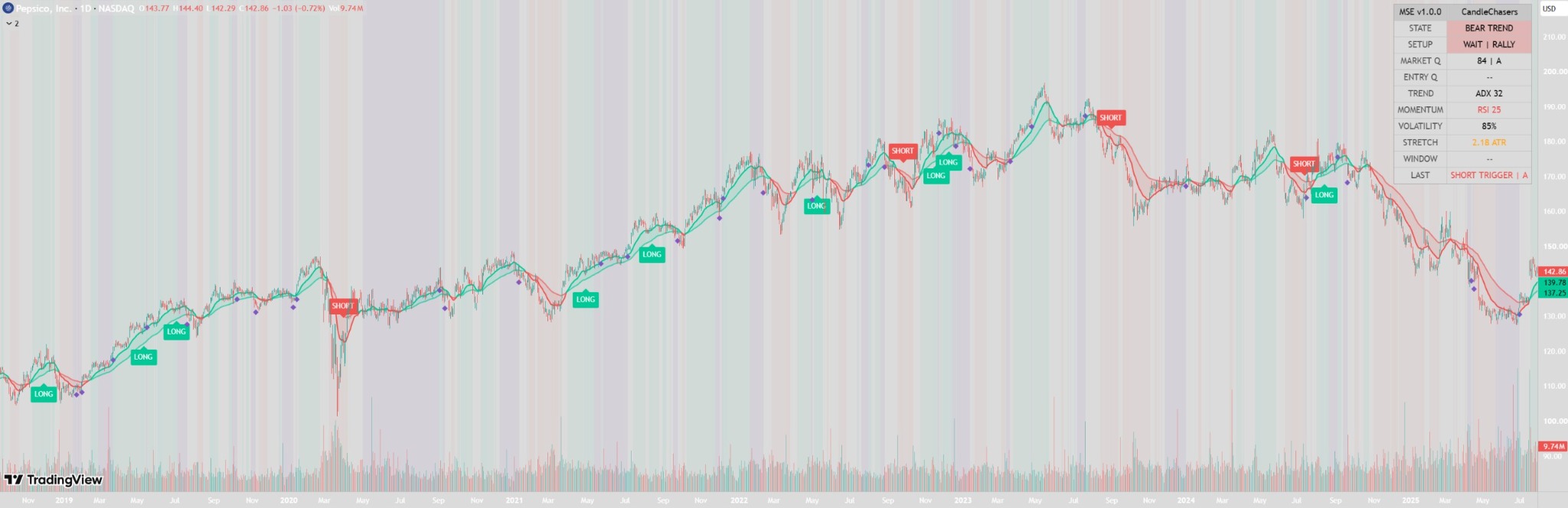
Market quality and entry quality are different
| Reading | What it evaluates |
|---|---|
| Market Q · 0–100 | Structure, trend, momentum, volatility and price location in the broader environment. |
| Entry Q · 0–100 | Market quality, pullback quality, trigger candle strength, momentum confirmation and optional volume confirmation. |
Both are internal condition-alignment scores. An 84 score does not mean an 84% chance of a successful trade.
Read the setup in stages
- Environment: Bull Trend, Bear Trend, Pullback, Rally, Compression or Chop provides context.
- Wait: a trend reading can coexist with WAIT | PULLBACK or WAIT | RALLY.
- Armed: LONG ARMED or SHORT ARMED identifies a developing qualified setup.
- Trigger: a qualified LONG or SHORT trigger appears when the required entry conditions align.
A setup being armed is not the same event as its entry trigger.
Read the PepsiCo example
In the supplied daily-chart screenshot, Entry Q is blank. The dashboard distinguishes its environment assessment from a qualified current entry. It also displays ADX 32, RSI 25 and stretch of 2.18 ATR. Those readings alone do not establish why an entry was withheld; that depends on the selected rules and settings.
LONG and SHORT markers on earlier candles are historical indicator events, not a trade-performance record.
How the anti-chase filter works
Price extension from the fast trend baseline is measured in ATR units. A setup can be rejected when price is too stretched, even when the environment score is strong. This is a rule-based filter, not a guarantee of a better fill or a profitable entry.
Compression and expansion
Volatility contraction is evaluated using ATR, Bollinger Band width and Bollinger/Keltner compression. Bullish or bearish expansion triggers also have to pass the selected trend, momentum, candle-quality and extension filters.
Choose a signal profile
| Profile | Rule behavior |
|---|---|
| Aggressive | Looser filters and more opportunities. |
| Balanced | CandleChasers’ recommended starting profile. |
| Conservative | Stricter qualification and fewer setups; not a measured performance improvement. |
| Custom | Direct control over trigger thresholds. |
Getting started
- Open the published script on TradingView and add it to your chart using the available controls.
- Begin with Balanced and keep Confirm Signals On Bar Close enabled.
- Review environment, setup and trigger separately on your chosen instrument and timeframe.
- Compare qualifying and rejected setups, including sideways periods and losing-looking examples.
- Use independent risk planning before acting on an indicator event.
Alerts and realtime behavior
Alerts include Long/Short Setup Armed, Qualified Long/Short Trigger, Any Qualified Trigger, Bullish/Bearish Expansion Trigger and Compression Released.
With confirmation enabled, setup and trigger events wait for the chart candle to close. Live dashboard readings and trend averages can change while that candle is forming. Configure alerts to match the bar-close behavior you intend.
Common questions
Does Market Q predict whether a trade will win?
No. It summarizes the alignment of selected conditions. It is not a probability, forecast or performance guarantee.
Why can a strong trend still show WAIT?
The environment and entry qualification are separate. A setup or trigger can be missing, or a selected filter can reject the entry.
Is this a backtested strategy?
This page describes an indicator. It does not provide tested returns, order execution or a win rate.
Use it as decision support
Settings, instrument, timeframe and live-bar behavior affect what you see. Independent analysis and appropriate risk management remain necessary. A historical chart illustration is not evidence of future performance.
Explore Squeeze Engine PRO for a separate compression and virtual-position workflow.
View the published script ↗ (paid link)