ANCHORED VWAP · VOLUME PROFILE · SAVED DAILY VIEWS
VWAP Heatmap Profile: TradingView Indicator
Compare anchored VWAP, weighted deviation bands and estimated volume concentration. Build a recent-day composite or review completed profiles beside their original trading days.
Open VWAP Heatmap Profile on TradingView ↗ (paid link)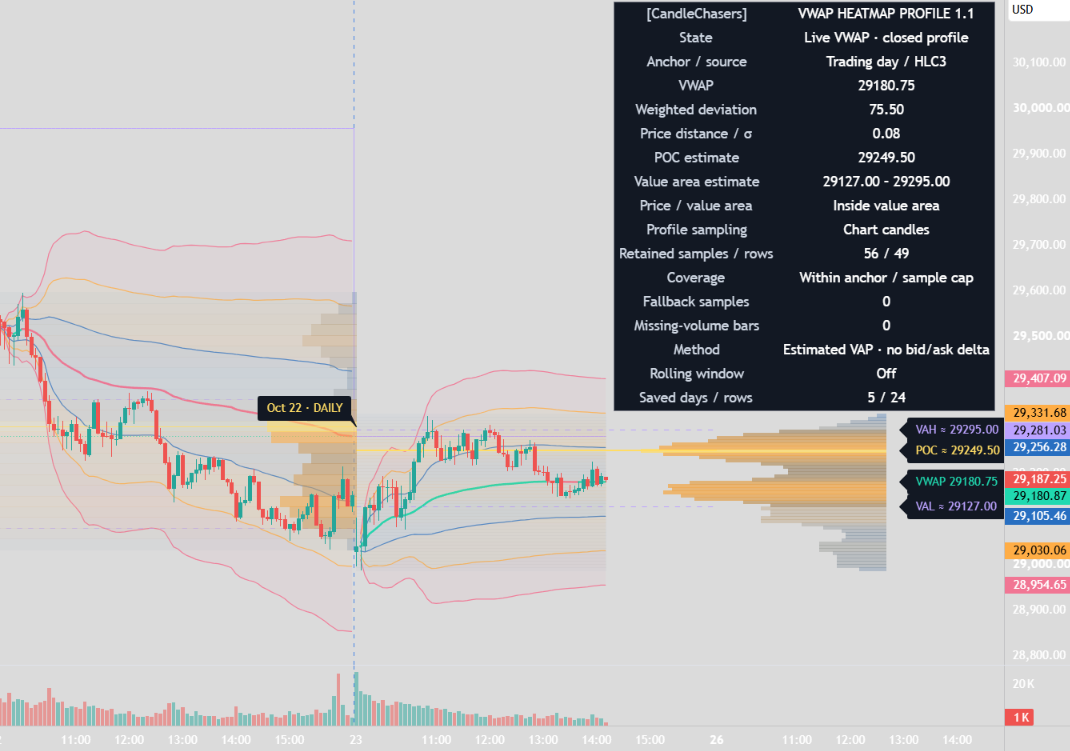
The profile is a candle-based estimate, not transaction-level volume or an order-book heatmap. POC, value area and deviation bands do not predict a guaranteed reaction.
One workspace for VWAP and volume context
VWAP Heatmap Profile [CandleChasers] combines anchored VWAP, weighted deviation bands, an estimated volume-at-price profile, and volume-concentration shading in one workspace.
Use a single anchor period, build a composite covering the most recent X trading days, or retain separate completed daily profiles beside their original days. Visibility controls let you display these views together or individually.
Vwap and deviation bands
VWAP uses the selected chart-candle source weighted by chart volume. Available sources are HLC3, HL2, OHLC4, and Close.
Three configurable band pairs surround VWAP, defaulting to 1, 2, and 3 weighted deviations. Optional shading separates the inner, middle, and outer zones. VWAP can change color with its slope, and an optional reference displays the previous anchor/window’s final VWAP.
Deviation is the volume-weighted population standard deviation of the selected chart-candle source observations. It is calculated using a weighted Welford update. It does not measure the dispersion of every individual transaction, assume a normal distribution, or assign a probability of price returning to VWAP.
Anchor options
Choose from:
- Trading day
- Recent X trading days
- Week
- Month
- Custom session
- Manual time
Trading-day, weekly, and monthly boundaries follow the symbol/feed’s corresponding periods. Custom sessions use configurable hours, day selections, and an IANA timezone. Manual mode starts at the first chart candle opening at or after the selected timestamp.
Day, Week, and Month anchors must be longer than the chart timeframe. Custom sessions require an intraday chart. Recent-day windows and saved daily profiles support chart timeframes of one day or lower.
Custom-session membership uses chart-candle opening time. A candle opening inside the window contributes its entire observation, so chart/session alignment matters.
Recent x trading days
Select Recent X trading days to combine the current developing trading day with the preceding X−1 observed trading days. The selection supports 1–30 days.
For example, a five-day window includes the current day and four preceding trading days present in the chart data. It does not mean five calendar dates or a fixed number of elapsed hours. Weekends and holidays without chart bars are not counted.
VWAP and deviation combine the included days’ chart-volume summaries. The oldest day drops out when a new trading day enters the window; the calculation does not restart from only that morning’s data.
The dashboard identifies how many observed days are loaded and flags an incomplete initial window.
Estimated volume profile
The right-side histogram estimates volume distribution across price rows.
Two allocation methods are available:
- Uniform candle range: distributes each sample’s volume proportionally across its high–low range.
- Selected source price: assigns the sample’s volume to the row containing its selected source price.
Zero-range samples assign their volume to one row. Row widths represent volume relative to the largest row. Color intensity increases with concentration, while value-area rows receive greater opacity.
The default is 60 requested rows. Row widths respect the instrument’s minimum tick, so narrow ranges can produce fewer effective rows.
These are candle-based estimates. The profile does not reconstruct transaction-level volume at price, bid/ask aggression, resting orders, or liquidation levels. Results can differ from other volume-profile tools and allocation methods.
Poc and value area
The Point of Control is the center of the highest-volume row. Tied maximum rows favor the center nearest the applicable VWAP reference, with the lower row selected for an exact distance tie.
Value area defaults to 70% of estimated profile volume. Starting at POC, the calculation expands contiguously toward the larger adjacent row. Equal available neighbors are included together. Whole-row inclusion can exceed the requested percentage.
VAH marks the upper boundary of the included area; VAL marks its lower boundary. These describe the estimated distribution and are not forecasts of where price must trade.
Volume-concentration heatmap
Horizontal shading shows the current profile’s volume concentration across its retained time range. Higher-volume rows receive stronger color intensity.
This is a current distribution snapshot, not an order-book heatmap or a historical sequence of independently developing profiles. Its grid, colors, POC, and value area can change as new samples alter the distribution.
When saved daily heatmaps are enabled, the current heatmap is clipped to the latest trading day by default to avoid double shading. The right-side composite profile still uses the full retained window. Disable the clipping option to extend composite shading across that window.
Profiles beside previous days
Completed daily profiles can remain beside their original days, with separate controls for:
- Number of completed days retained, up to 10
- Profile and heatmap together, or either individually
- Histogram width within each day
- POC, VAH, and VAL lines
- Final daily VWAP reference
- Day labels and tooltips
Each daily histogram sits inside its day’s right edge. Its volume distribution is independent of the current composite profile.
Saved daily history uses the whole available symbol/feed trading day, even when the main VWAP uses a custom session or manual anchor. The saved VWAP line is a final daily reference, not a replay of that day’s developing VWAP curve.
A daily snapshot is created and frozen at the first closed chart candle of the next observed trading day. It is drawn over the completed day for comparison, but was not available on that day’s earlier candles. Saved snapshots do not generate current-profile crossing alerts.
Historical row counts are automatically budgeted against current-profile settings and retention count to stay within drawing limits.
Optional lower-timeframe sampling
Profile sampling defaults to chart candles. Optional lower-timeframe sampling uses available intrabar candles to build a finer candle-based estimate.
The sampling timeframe must be below the chart timeframe, with no more than 500 nominal intrabars per chart candle.
If no usable positive intrabar volume is returned for an included chart candle, usable chart data becomes a fallback sample. The dashboard reports retained fallback samples. Missing individual intrabars are not reconstructed, and feed totals can differ between timeframes.
Lower-timeframe sampling affects the profile. VWAP and deviation continue using chart-source observations weighted by chart volume.
Data windows and refresh
The profile retains up to 3,000 samples by default, configurable to 5,000. In lower-timeframe mode, samples are intrabars rather than chart candles.
Once the cap is reached, the oldest samples are replaced. VWAP retains the full selected anchor or recent-day window, while the profile may cover a shorter range. The dashboard explicitly flags this difference. Saved daily profiles use a separate capped buffer.
VWAP develops during the open chart candle. The current profile updates at chart close and initially loads from the last confirmed historical candle. Its drawings therefore remain the previous closed snapshot while VWAP can update live.
Plot lines can break on the first candle of an anchor/window rotation. That visual gap does not exclude the candle from calculations.
Display and alerts
Separate controls cover VWAP, bands, deviation shading, the current profile, concentration heatmap, previous VWAP, saved daily views, levels, labels, and the dashboard.
Price-label sizes and dashboard sizes are adjustable. The dashboard offers four corners and uses light text on an opaque dark background. Inputs are hidden from the chart’s status line.
Eight named alert conditions cover:
- VWAP crosses above and below
- Upper and lower outer-band breaks
- Return through a middle-band boundary
- Prior estimated POC crosses
- Entry into the prior value area
- Exit from the prior value area
Use Once Per Bar Close for named conditions. Select Any alert() function call for aggregated enabled events and additional threshold details.
Profile alerts compare both closes against the same previous closed profile snapshot before replacing its levels. They require the immediately preceding snapshot from the same active anchor/window and are suppressed at window rotations.
VWAP and band relationships can change because price or the reference itself moves. Profile alerts are intended for forward operation after initialization; historical developing profile levels are not backfilled on every candle.
Recreate saved alerts after changing settings or code.
Getting started
- Add the indicator to a standard time-based candlestick chart.
- Leave sufficient right-side chart space for the profile and labels.
- Select an anchor, or choose Recent X trading days and set the day count.
- Enable completed daily profiles if you want separate views beside earlier days.
- Review coverage, retained samples, and fallback information in the dashboard.
- Adjust rows, history retention, shading, and fonts for readability.
Purpose and limitations
VWAP, deviation bands, and volume-profile concepts are established methods. This implementation combines explicit anchor/window selection, bounded profile sampling, disclosed volume allocation, current and completed-day distribution views, and alerts tied to closed snapshots.
It is a visual analysis indicator. It places no orders, provides no strategy backtest or verified win rate, and makes no profitability claim.
Results depend on source selection, chart timeframe, available history, volume quality, sampling resolution, and feed revisions. Missing volume is not replaced with invented volume. Nonstandard charts can distort the underlying observations. No VWAP distance, volume concentration, POC, or value-area boundary guarantees a future reaction.
Common questions
Is this an order-book or liquidation heatmap?
No. Shading represents estimated traded-volume concentration allocated from chart or available lower-timeframe candles. It does not show resting orders, bid/ask aggression or liquidation levels.
Why can VWAP move while the profile stays still?
VWAP develops during the open chart candle. The current profile is refreshed at chart close, so its drawings show the previous closed snapshot until the next update.
Does Recent X trading days mean calendar days?
No. It includes the current developing trading day plus the preceding X−1 observed trading days present in chart data, up to 30 days.
Were saved daily profiles available earlier that day?
No. A daily snapshot is frozen at the first closed candle of the next observed trading day and drawn over the completed day for comparison. It was not available on the earlier candles.
Does lower-timeframe sampling change VWAP?
No. It changes the profile estimate. VWAP and deviation continue using chart-source observations weighted by chart volume.
For flexible trend comparisons, explore 40 Moving Averages. To review selective swing levels, see Support & Resistance.
Open VWAP Heatmap Profile on TradingView ↗ (paid link)